Gutter and anchors
The gutter is the strip between the line numbers and the code. It has three lanes. From left to right: Git changes, specs anchored to the code, projectdocs entries anchored to the code. A click on a mark opens a panel below the line.
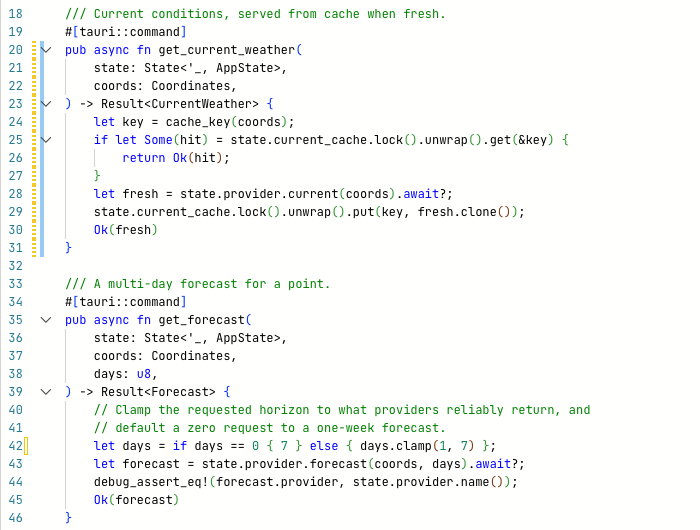
get_current_weather (lines 20–31) carries a striped yellow spec mark and a blue projectdocs mark. Line 42 has an outlined yellow Git mark: a change in a changelist that is not active.
Git lane
The left lane compares the file with the last commit (HEAD).
| Mark | Meaning |
|---|---|
| Green bar | Added lines. |
| Yellow bar | Changed lines. |
| Red triangle | Lines were deleted below this point. |
| Outlined bar, faded triangle | The change belongs to a changelist that is not active. |
Click a mark to open the QuickDiff panel:

QuickDiff for line 42: HEAD on the left, working tree on the right, the commit that last touched the line in the header.
| Element | Effect |
|---|---|
| ‹, › | Step through the commits that touched this line (up to 20). The header shows hash, author, date and message. The diff below always compares HEAD with the working tree. |
| in: changelist | The changelist that owns the change. · active marks the active one. |
| Move to… | Moves the change to another changelist. |
| Revert hunk | Restores this block from HEAD. The editor reloads the file. |
✕ or Escape | Closes the panel. |
The marks update after saving and after changes by other programs.
Inline blame
At the end of the line with the cursor, grey text shows author, age and message of the commit that last changed the line. Git › Toggle Inline Blame switches it off and on. It is on by default.
Spec lane
The middle lane marks symbols that a spec is anchored to. The mark is striped and covers the whole symbol. Its colour is the spec's status; with several specs the most critical status wins.
| Colour | Status |
|---|---|
| Red | rejected |
| Yellow | draft or review |
| Green | approved |
| Grey | other |
Pointing at the mark lists the specs. A click opens a panel with ID, status and title of each spec and Open in Spec View.
projectdocs lane
The right lane marks symbols that a projectdocs entry is anchored to. The mark is a blue bar over the whole symbol.
Pointing at the mark shows 1 doc anchored here: (or N docs) with the titles. A click opens Doc anchored on this line with the title of each entry, the symbol it anchors and Open entry, which opens the entry in the projectdocs dashboard.
Show or hide the spec and projectdocs lanes
Editor › Show Spec & Docs Gutter switches both lanes off and on. They are on by default. The Git lane stays visible.
Anchors that no longer fit
An anchor points to a symbol, not to a line number. It follows the symbol when lines are added above it. When the anchored symbol changes, is renamed or removed, the anchor becomes suspect. The gutter does not mark suspect anchors. They show in the spec and projectdocs views. See Spec anchors and projectdocs anchors.