Keep the index current
The analysis turns the project's source files into the index: symbols, calls, imports, findings, the search index and the interface index. Graph, search, gutter, Call Chain Explorer and the assistant's tools all read it. The index lives in the exploration's analysis cache on this machine. It can be deleted at any time and is rebuilt from the source.
Tracemoor keeps the index current in three ways: when the project opens, when a file changes, and on request.
When the project opens
On opening, Tracemoor compares the project with the stored index. The stored index is still valid when the checked-out commit, the changed files with their content and the exclusions are the same as at the last analysis.
- Valid: the project opens directly. The status bar shows ⚡ cached with the age of the index.
- Not valid, or the project was never analyzed: the project opens on Review before analyzing. Click Analyze to run the analysis.

83 files, 243 symbols and 647 edges, loaded from an index that is 25 minutes old. The symbol index for search by meaning is ready.
Analyze works incrementally when an index exists: it re-parses only new and changed files and removes deleted ones. When 500 or more files, or 10 % of all files, changed, it analyzes the whole project. The first analysis of a project always covers all files.
After a fresh analysis the status bar shows fresh analysis instead of ⚡ cached.
Review before analyzing
The screen shows how many source files and directories the project has and
how many exclusions are active. Under Suggested exclusions it lists
groups that rarely belong in the graph: *.test.*, *.spec.* and
*.stories.* files, and folders named tests, __tests__, __mocks__,
mocks, examples and fixtures.
- Tick the suggestions to exclude. Accept all ticks all of them, Clear all none.
- Check the count next to Analyze. It shows how many source files remain after the exclusions.
- Click Analyze.
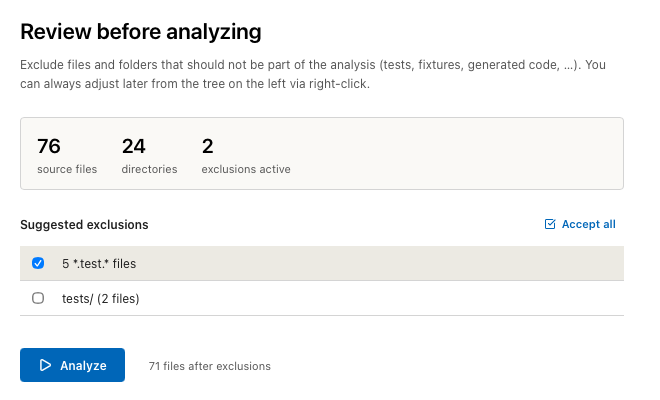
Excluding five test files leaves 71 of 76 source files.
The analysis also skips files that .gitignore ignores, and the folders
node_modules, dist, build, target, vendor, coverage, .venv,
__pycache__ and the build folders of common web frameworks (.next,
.nuxt, .svelte-kit and others). The count does not subtract these.
Exclude files and folders
An exclusion removes a file, a folder or a file-name pattern from the analysis. Excluded files stay in the file tree and can be opened and edited. They are not in the graph, the search or the assistant's tools.
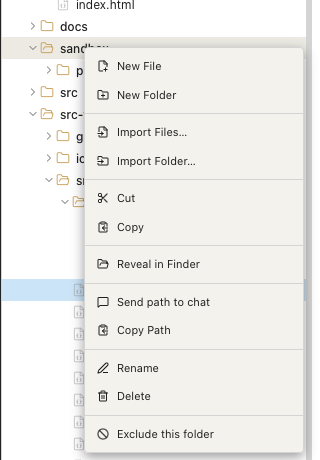
- In the file tree, right-click the file or folder.
- Click Exclude this file or Exclude this folder. For files, the menu also offers patterns such as Exclude all *.ts files.
- Choose Analysis › Re-analyze Project to apply the change.
The tree shows excluded entries struck through in grey, and its header shows the number of active exclusions, such as 1 excluded. To undo an exclusion, right-click the entry and click Include folder again or Include file again, then re-analyze.
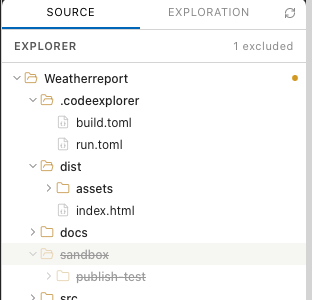
The folder sandbox is excluded.
Exclusions are stored per machine in the exploration and are not shared through Git.
Changes while you work
Tracemoor updates the index for each changed file:
- Saved in Tracemoor: the file is re-parsed right after saving.
- Changed outside: a file watcher notices changes made by another editor, the assistant, a formatter or Git (checkout, merge, rebase). It updates the index for each file about half a second after the change.
Both follow the same rules as the analysis: excluded and ignored files stay out of the index. A file that no longer parses keeps no symbols until it is fixed. Tracemoor then shows Parse error — analysis for this file cleared. after a save, or External edit parse error in … — symbols cleared until fixed. for an outside change.
The Graph View, search, the gutter and the assistant's tools read the updated index. These keep the state of the last analysis until the next one:
- the Call Chain Explorer,
- findings (
F8) and metrics, - the counts in the status bar,
- the interface index between linked references.
Re-analyze
Analysis › Re-analyze Project (Cmd+Shift+R, Windows/Linux:
Ctrl+Shift+R) analyzes the project again, even when the stored index is
still valid. Parse results of unchanged files are reused.
Re-analyze after:
- changing exclusions,
- an update of Tracemoor, so that improvements of the analysis take effect,
- changing the interface wrappers in Project Settings,
- a large change outside Tracemoor, to bring findings, metrics and the Call Chain Explorer up to date.
While the analysis runs, an overlay shows its progress: the number of files parsed, then steps such as Building graph..., Clustering modules... and Indexing text….
Clear the cache
Analysis › Clear Cache & Re-analyze deletes the stored index of the project and analyzes all files from scratch. Use it when the index seems wrong and a re-analysis does not help.
The semantic indexes are deleted too. The assistant's tool server rebuilds the symbol index for search by meaning in the background when the next chat session starts. The status bar shows its progress as 🧠 index with a percentage, and 🧠 index ✓ when it is ready. On a large project this takes several minutes. The index of projectdocs anchors is restored from the entries during the analysis.
Specs, projectdocs, documents and settings are files in the exploration. Clearing the cache does not touch them.
Semantic index of projectdocs and specs
Analysis › Rebuild Semantic Index rebuilds the index the assistant uses to search projectdocs entries and specs by meaning. It runs in the background and does not touch the code index. Use it after a fresh checkout of the exploration or when search by meaning in projectdocs returns outdated results.
The assistant and the index
| Tool | Use |
|---|---|
status | Age of the index, analyzed commit, counts per language. The assistant calls it first to check whether the index is current. |
reanalyze_project | Starts a re-analysis from the chat and returns right away. With clear_cache it clears the cache first. Not available in ReadOnly mode. |
Limits
- Exclusions take effect with the next analysis. Until then, excluded files remain in the index.
- The Review before analyzing count includes files that
.gitignoreor the build folders exclude, and counts only files whose language the file tree recognizes. - After a pull, the index of projectdocs anchors is not compared with the
entries. New or removed anchors from other machines appear after the
assistant runs
projectdocs_sync_anchors.