Language servers
A language server is a separate program that knows one language in depth: its types, scopes and imports. When one runs for a file's language, the editor uses it for Go to Definition, Go to References, hover, Go to Type Definition and Go to Implementations. The graph uses it for Sharpen.
Without a language server the editor falls back to the analysis graph for definitions and references. Hover, type definitions and implementations then return nothing. Graph, search, findings and anchors never depend on a language server.
Servers are installed once per machine and start on demand per project.
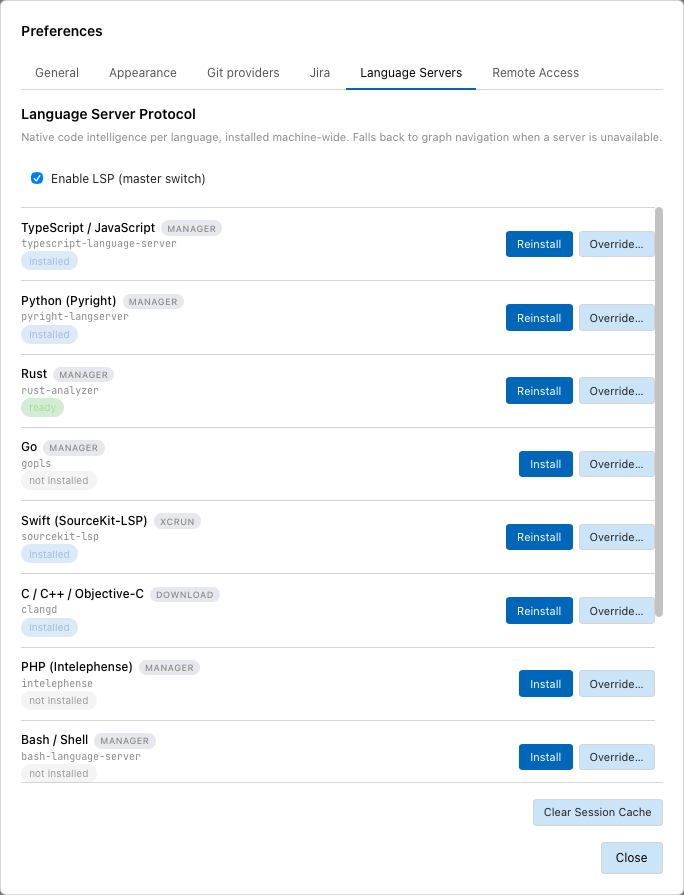
Rust is running (ready), Go and PHP are not installed.
Open the settings
Analysis › Language Servers… opens Preferences on the Language Servers tab. A click on the language server badge in the status bar opens it too.
Enable LSP (master switch) switches all language servers on or off.
Install a server
- Open Analysis › Language Servers….
- In the row of the language, click Install.
The row shows the progress. When the server is on the machine the status reads installed and the button changes to Reinstall.
The label next to the language name says how the server is installed:
| Label | Installation |
|---|---|
| MANAGER | Through a package manager that must be on the PATH, for example npm, rustup or go. |
| DOWNLOAD | Tracemoor downloads a pinned version for the platform and checks its SHA-256. |
| XCRUN | Part of Xcode. Install only checks that xcrun finds it. |
Available servers: TypeScript / JavaScript, Python (Pyright), Rust, Go, Swift (SourceKit-LSP), C / C++ / Objective-C, PHP (Intelephense), Bash / Shell, YAML, Kotlin, Java (Eclipse JDT).
Use your own server binary
- In the row of the language, click Override….
- Pick the server executable.
The row shows override: with the path. Clear returns to the installed server.
Status
The status bar shows a badge for the language of the open file, for example rust-analyzer: ready.
| Status | Meaning |
|---|---|
| not installed | No server binary found. |
| installed | Binary present, no session running for this project. |
| spawning…, starting… | The server is starting and indexing. |
| ready | The server answers requests. |
| failed | The server did not start or stopped. The tooltip shows the reason. |
| installing… | An installation is running. |
A server that has not answered within 800 ms for a request is skipped for that request; the editor answers from the graph.
Clear Session Cache stops the running sessions. The next request starts them again.
Limits
- Files of a reference project never start a language server. They open read-only and use the graph.
- Objective-C files belong to the C / C++ server, but the editor does not ask a server for them.
- Ruby, Lua, Scala and the other analysed languages have no language server. Navigation uses the graph.