Navigate in the editor
The editor resolves symbols across files. Definitions and references come from a language server when one runs for the file's language, and from the analysis graph otherwise.
Go to a definition
- Place the cursor on a name, or hold
Cmd(Windows/Linux:Ctrl) and point at it. - Right-click and choose Go to Definition, or
Cmd-click the name.
If the definition lies in another file, that file opens in a tab, the editor scrolls to the definition and the details panel selects the symbol. The explorer expands to the file. From Graph + Editor Split the jump switches to the Source View.
The editor context menu
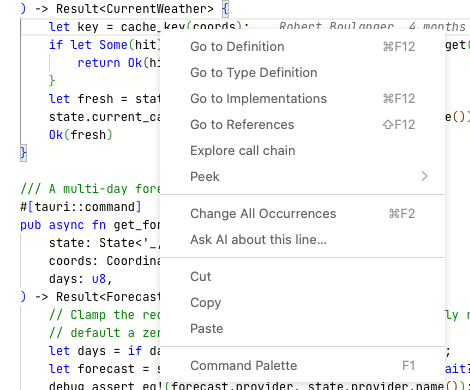
Context menu on cache_key.
| Entry | Shortcut (macOS) | Effect | Source |
|---|---|---|---|
| Go to Definition | Cmd+F12 | Jumps to the definition. | Language server, else graph |
| Go to Type Definition | Jumps to the type of the expression. | Language server only | |
| Go to Implementations | Cmd+F12 | Lists implementations of an interface or trait. | Language server only |
| Go to References | Shift+F12 | Lists the places that use the symbol. | Language server, else graph |
| Explore call chain | Opens the Call Chain Explorer for the declaration at or above the cursor. | Analysis | |
| Peek › Peek Definition | Alt+F12 | Shows the definition in an embedded window. | as above |
| Peek › Peek Type Definition, Peek Implementations, Peek References | Embedded versions of the entries above. | as above | |
| Change All Occurrences | Cmd+F2 | Selects every occurrence of the word in the file for editing. | Editor |
| Ask AI about this selection… | Opens a question about the selected lines in the chat. Shown with a selection. | Chat | |
| Add Selection to AI Context | Adds the selected lines to the chat context without sending a message. Shown with a selection. | Chat | |
| Ask AI about this line… | Opens a question about the line at the cursor. | Chat | |
| Command Palette | F1 | Monaco's command list. | Editor |
Entries marked "language server only" return nothing when no server runs for the language.
Peek a definition
Peek shows the target inside the current file, below the line you are on.
- Place the cursor on a name.
- Press
Alt+F12, or right-click and choose Peek › Peek Definition.
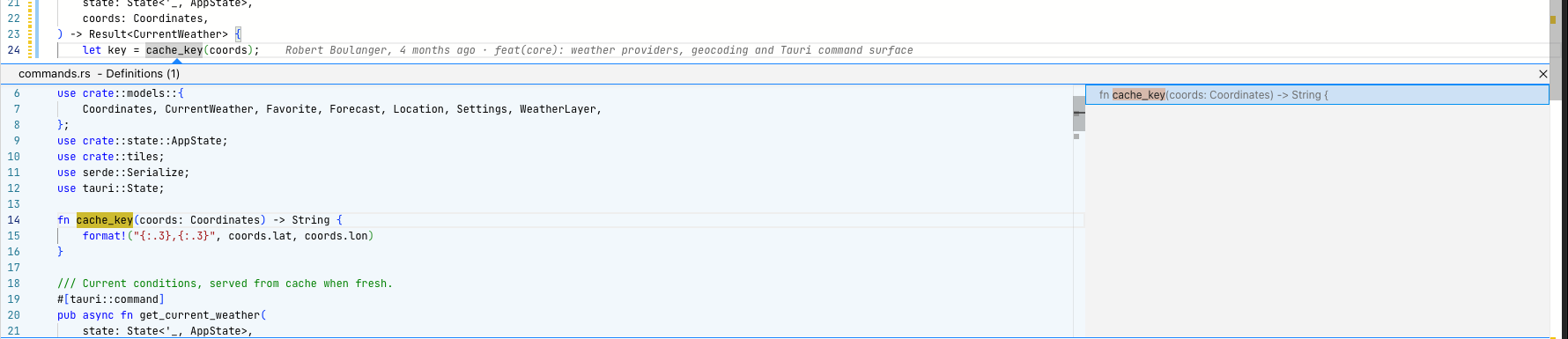
Peek on cache_key: the definition in the left pane, the list of results on the right.
The peek window has its own editor and scrolls. With several results, the
list on the right switches between them. Double-click in the peek to open
the file there. Escape closes it.
Hover
When a language server runs for the file, pointing at a name shows its signature and documentation comment. Without a language server there is no hover on names.
Pointing at a mark in the gutter shows what is anchored there. See Gutter and anchors.
Follow calls
- Right-click inside a function and choose Explore call chain.
- In the details panel, click N callers → or N callees →. Both open the Call Chain Explorer.
- In the details panel, click an entry under Called by or Calls to draw it in the graph. See Editor details panel.
Step through findings
View › Next Issue (F8) and View › Previous Issue (Shift+F8) open
the next or previous analysis finding (cycle, dead export, orphan) at its
location.
Links into the code
Chat answers and projectdocs entries refer to code with ce:// links. A
click opens the target in the editor or another view.
| Link | Effect |
|---|---|
ce://file?path=<path>&line=<n> | Opens the file and scrolls to the line. |
ce://symbol?file=<path>&name=<name>&line=<n> | Opens the file and selects the symbol. |
ce://call-chain?file=<path>&name=<name>&line=<n> | Opens the Call Chain Explorer for the symbol. |
ce://view?target=code | Switches to the Source View. |
<path> is relative to the project, an absolute path also works. For a file
of a reference project add ref=<slug> and give the path relative to that
repository, for example
ce://file?ref=weatheringest&path=app/api.py&line=40. The file opens
read-only. If the reference project is missing on this machine, the link
opens the reference settings instead.
Limits
- No back and forward history between jumps. Return through the tabs.
- Without a language server, Go to Definition picks the symbol of that name from the graph. With several symbols of the same name it prefers the one in the current file.
- Moving the cursor does not select the symbol in the details panel or the graph.