Calls between linked projects
A call graph of one project ends where a call leaves the process: an HTTP
request, a message to a webview, a command, a Tauri invoke. For a reference
with the purpose Linked (calls each other), Tracemoor connects such
calls with the code in the other project that answers them. Set the purpose as
described in Attach and manage references.
Example: fetchModelForecast in Weatherreport sends GET /forecast. In the
reference WeatherIngest, get_forecast in app/routers/forecast.py answers
it. The cross-project call tree draws both and the edge between them.
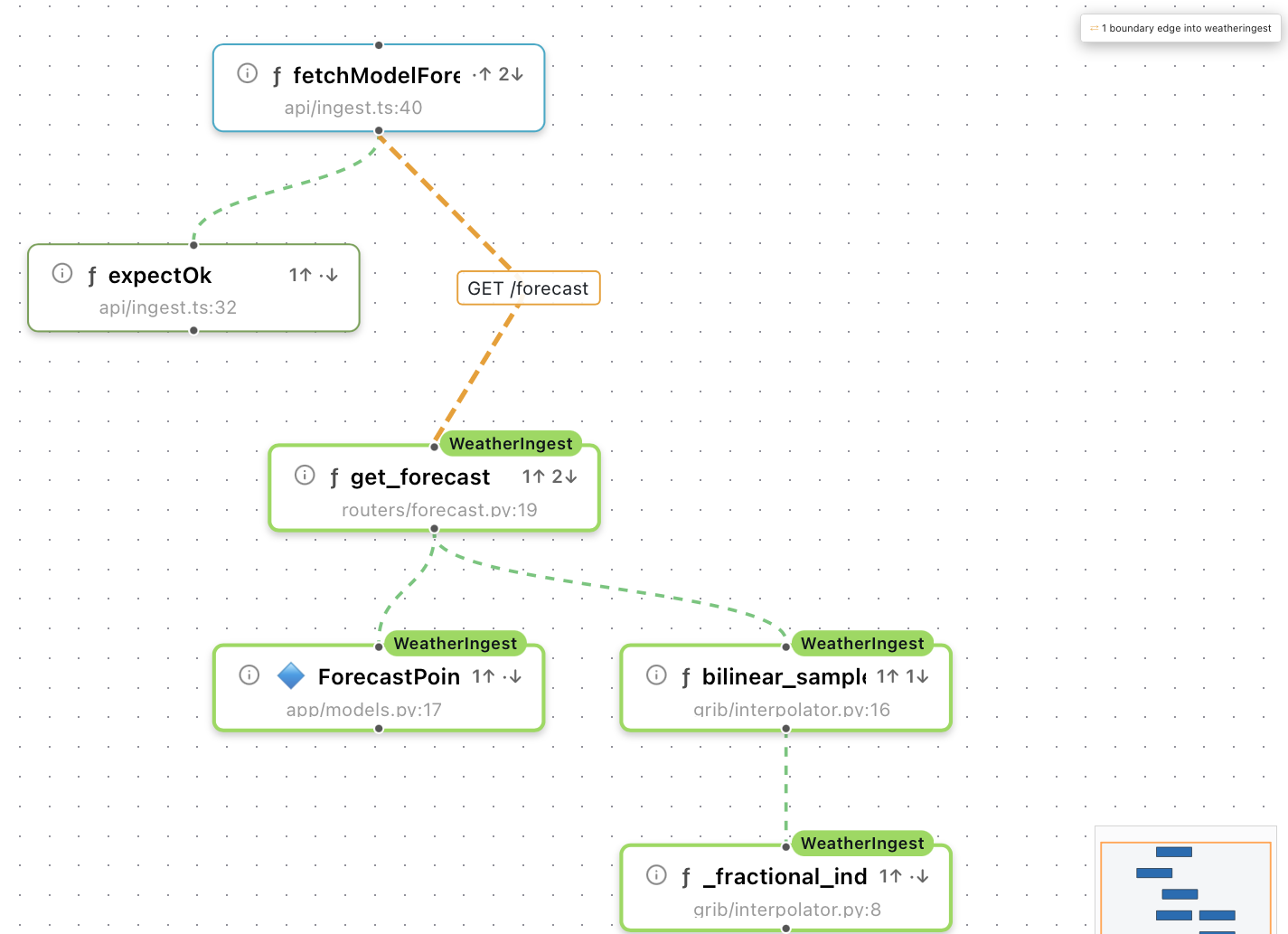
The orange edge GET /forecast crosses into WeatherIngest. Nodes of the reference carry its name.
What is detected
Every analysis builds an interface index of the project. Each entry is a call (the project uses an interface) or an offer (the project provides it), and belongs to the symbol that contains it.
| Kind | Call | Offer |
|---|---|---|
http | fetch, axios.*, functions whose name starts with an HTTP verb and whose first argument is a path (getJson('/x')) | JAX-RS, Spring, Express, FastAPI, Flask |
message | postMessage({ command: 'x' }), new MessageEvent(…) | case 'x': in a switch over the message field, msg.type === 'x' |
global | window.x(…) | window.x = … |
command | executeCommand('x') | registerCommand('x'), contributes.commands in the package.json of a VS Code extension |
ipc | invoke('x') | #[tauri::command] fn x |
Details that decide whether a call is found:
- HTTP paths are normalized. Host and query are dropped.
{id},:idand${expr}count as the same parameter. - A path may come from a
constin the same function. Withconst path = id === '/' ? '/resources/' : `/resources/${id}`;each branch of the conditional becomes an entry. - Message names may be constants, also constants imported from another file.
- Nested messages get a combined key.
{ type: 'APP_ACTION', action: { command: 'runStep' } }has the keyAPP_ACTION/runStep, and so does the handler that checksAPP_ACTIONfirst and then switches overaction.command. - Messages sent from different folders of one project (two webviews, for example) are separate channels. A message the project answers itself is not matched to a handler of the same name in the other project.
- Test files, minified files and bundles, commented-out code,
event.type === 'keydown'and Redux reducers are ignored.
Add your own wrapper functions
Projects often call their server through their own functions, such as
apiCall('/users/' + id). Tracemoor does not recognize these unless the
name starts with an HTTP verb.
-
Choose Analysis › Project Settings….
-
In Interface Wrappers (optional), enter one function per line:
apiCall notifyHost:message runCommand:command -
Click Save.
-
Choose Analysis › Re-analyze Project.
A name without suffix means the first argument is an HTTP path. With
:message it is a message name, with :command a command ID. The list is part
of the shared exploration settings.
Confidence of a link
The linker compares the calls of one project with the offers of the other, in both directions. It stores nothing and computes the links on every query, so they are never out of date.
| Confidence | Meaning |
|---|---|
exact | Method and path, or name, match. |
pattern | The path matches through parameters, the method matches. |
path | Only the path matches, the method does not. |
ambiguous | Several offers answer the call equally well, for example behind a JAX-RS sub-resource locator. All candidates are returned. |
A common path prefix such as /v1 is detected: the linker tries the first
segments of the offered paths and uses the prefix with which most calls find an
offer.
A call without a match is a finding. It goes to a third service, or to an
endpoint that does not exist in the state the reference reads. Calls without a
single fixed path segment are neither linked nor counted as unresolved.
Commands of a host namespace (vscode.open, workbench.*) are not counted as
unresolved.
Follow a call in the graph
Two ways lead across the boundary in the graph:
- In the perspectives callers, callees and call_tree, click ⇄ References at the top right of the canvas, or choose View › Show Reference Projects in Graph. The graph continues the calls at the interfaces into the linked references.
- Right-click a node and choose Cross-project call tree, or type
cross-project call tree of fetchModelForecast depth 2in the query bar.
In the cross-project call tree:
- Nodes of a reference carry a chip in its colour. A double click opens the file read-only.
- Boundary edges are dashed orange and labelled with the interface key, for
example
GET /forecastormessage stepSelected. Links with confidencepathorambiguoushave shorter dashes and a muted colour. - For
ambiguouslinks, every candidate is drawn. - If an endpoint is an interface method without a body, the tree continues
through an
implemented byedge into the implementing classes. - A box at the top right counts the boundary edges, and the unresolved calls if there are any. Its tooltip lists them.
Follow a call in the Call Chain Explorer
The Call Chain Explorer (View › Call Chain Explorer) also crosses the boundary:
- If the focus symbol calls an endpoint of a linked reference, the
implementation appears as an extra card on the callee side, marked
⇄ GET /forecast. - If the focus symbol is called from a reference, those callers appear on the caller side.
- Focus → on such a card moves the focus into the reference. The chain then continues in the reference's index.
- If the focus is an interface method without calls of its own, the callee side
lists its implementations as
↳ implemented by.
Limits
- Detection is static. A path that is only assembled at run time is not linked.
- Bundles shipped inside a reference, for example a built web app in the repository of an extension, are skipped.
- The interface index is rebuilt with every full analysis. Updating a single file on save does not change it.