Find your way in a codebase
After the first analysis, the index answers structural questions about the project without reading files. This topic suggests an order for a codebase you do not know yet. Each step links to the topic that describes the function in full.
Start at the entry points
- Choose View › Graph View.
- In the query bar, open Perspectives… and choose Entry Points.
- Double-click an entry point. The graph continues with its call tree.
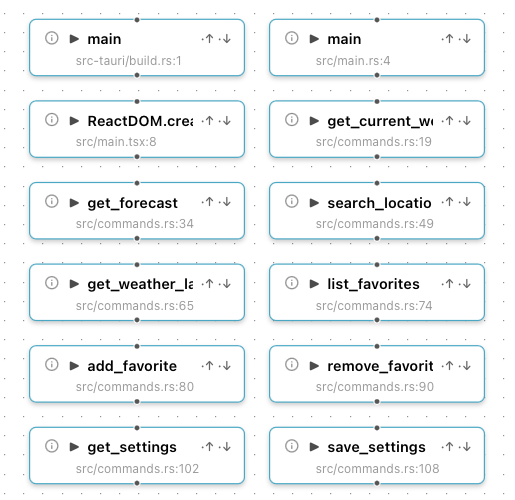
Weatherreport has two main functions (the program and its build script), the React root and nine Tauri commands.
The status bar shows the number of detected entry points. Which rules apply per language is listed in Entry points.
Find the heavy files
Perspectives… › Complexity Hotspots draws the 20 files with the highest score from size and imports in both directions. These files tend to hold the central logic. A generated file at the top of the list is a candidate for an exclusion.
Look at the findings
Dead Exports, Orphan Files and Circular Dependencies show
structural findings. In the editor, F8 steps through them, see
Step through findings.
Treat them as hints. A framework that loads files by convention produces orphan files that are in use. See Findings are hints.
Follow one flow
Pick one function that matters, for example a command that a user triggers.
- In the query bar, enter
call chain of <name>. - Open the Call Chain Explorer for a step-by-step view with source previews.
See Perspectives and queries and Call Chain Explorer.
Find the code behind the user interface
To find where a visible label, button or message comes from, search for the
text on the Text tab of File › Go to File/Symbol… (Cmd+P,
Windows/Linux: Ctrl+P), see
Find the code behind a label. The AI does
the same from a screenshot, see
Ask with a screenshot.
Ask the AI
The AI answers from the index, so questions about structure cost few tokens and come back with links into the code and the graph. Useful first questions:
- "What are the main modules of this project and how do they depend on each other?"
- "Which entry points does a user trigger, and what does each one do?"
- "Where is the configuration read, and which settings exist?"
A session in the ReadOnly mode cannot change files. See How the AI works in Tracemoor.
Keep what you learn
Write findings down as projectdocs entries and anchor them to the symbols they explain. The next person, and the AI in the next session, finds them from the code. To describe the current behaviour formally, generate specs from the code.