Project Settings
Project Settings holds the settings of the open exploration. Open it with Analysis › Project Settings…. Settings of the installation are in Preferences.

The five tabs of Project Settings.
| Tab | Content | Described in |
|---|---|---|
| General | Cluster root, Jira project, interface wrappers, vault, reference projects | General on this page |
| AI Hints | Guidance for every AI session, stored in .codeexplorer/project_hints.md | Project Hints |
| MCP Servers | External MCP servers enabled for this exploration | Enable a server for an exploration |
| Specifications | Active spec profile, profile import | Choose a profile |
| Signing | Signing method, signer identity, passphrase, audit chain check | Set up signing |
On General and AI Hints, click Save to apply changes. The other tabs save through their own controls.
General
| Field | Effect | Stored |
|---|---|---|
| Project | Folder of the analyzed project. Read only. | this machine |
| Effective Cluster Root, Auto-Detected Default, Explicit Cluster Root (optional) | Folder whose subfolders become the top-level clusters. Leave the explicit field empty to use the detected default (src, then lib, then app, then the project root). Browse… picks a folder. See Set the cluster root. | this machine |
| Jira Project Key (optional) | Default project for the ticket picker and for new Jira issues. Below the field, the query the picker runs. Reset JQL to default discards a query you saved in the picker. See Jira project of an exploration. | this machine |
| Interface Wrappers (optional) | Functions of the project that call across a process boundary, one per line. Applied at the next re-analysis. See Interface wrappers. | shared |
| Vault Remote (backup) | Git remote that receives an automatic backup push. See Vault. | this machine |
| Reference Projects (read-only) | Projects attached as references, with purpose, git access, state and snapshots. Reference Sets… opens the named combinations of states. See Attach a reference project. | declaration shared, folder on this machine |
Shared settings are written to .codeexplorer/config.json of the exploration
and travel with it through git. Settings for this machine are written to
.codeexplorer/local.json, which git ignores. See
What is shared.
Vault
The vault is a git remote that receives a copy of the project repository
after every commit. Tracemoor pushes all branches and tags there. The push
runs when the current commit of the repository changes, so commits from the
terminal or from an AI session are backed up as well. A failed push never
blocks a commit. Pushing to origin is not affected.
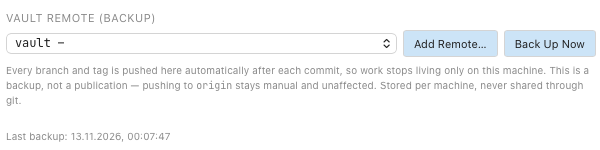
The Vault Remote section with a configured vault. The remote URL is blanked out.
Prerequisite: an empty repository at the target, for example a new repository
on a server, or a folder created with git init --bare.
- Choose Git › Configure Vault…. Project Settings opens at Vault Remote (backup).
- Choose an existing remote in the list, or click Add Remote…, enter a name and the URL, and click Add & Use.
- Click Back Up Now for the first push.
The line below the list shows the last backup or the last error. In the status bar, the vault entry shows the time of the last backup. It turns orange when the last push failed or the last backup is more than six hours old. Click the entry, or choose Git › Back Up to Vault Now, to push at once.
To stop the backup, choose Off — no automatic backup in the list.
The vault setting is stored for this machine only. Other users of a shared exploration keep their own vault.