Profiles
A profile defines the rules for the specs of an exploration: artifact types, fields, link types, statuses, signatures and the trace chain. Tracemoor ships two profiles. Others can be imported as YAML files.
| Profile | Types | Trace chain | Signature for approval |
|---|---|---|---|
| GAMP 5 (Pharma) | URS, FS, TC | URS → FS → TC | yes |
| IEC 62304 (Medical Device Software) | SRS, SDS, TC | SRS → SDS → TC | no |
Without a choice, an exploration uses GAMP 5.
The profiles are set in Analysis › Project Settings… on the Specifications tab.
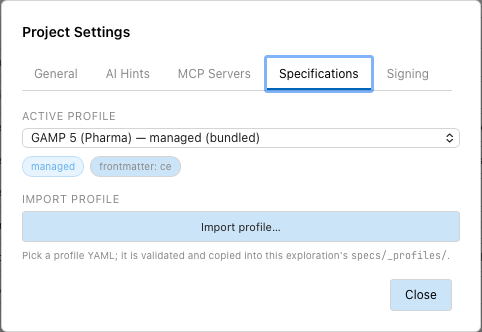
Choose the active profile
- Open Analysis › Project Settings… and the Specifications tab.
- Under Active profile, choose the profile.
Each entry shows the storage mode and where the profile comes from:
(bundled) for a profile shipped with Tracemoor, (override) for an
imported profile that replaces a shipped one with the same slug. Tracemoor
reads all specs again with the new profile. The chips under the menu show the
storage mode and the frontmatter format of the active profile.
The choice is stored on this machine, in the analysis database of the exploration. It is not shared through git, and Analysis › Clear Cache & Re-analyze resets it to GAMP 5. Choose the profile again after a clone or a cleared cache.
Import a profile
- Open the Specifications tab.
- Click Import profile… and choose the YAML file.
Tracemoor checks the file and copies it to specs/_profiles/<slug>.yaml.
The slug comes from the slug: field in the file, not from the file name. If
the file has errors, all of them are listed at once and nothing is copied.
After the import, choose the profile under Active profile.
specs/_profiles/ is part of the shared exploration. Teammates receive the
profile with the next pull. The schema is described in
Profile reference.
Managed and sidecar profiles
The storage field of a profile decides who owns the spec files.
managed | sidecar | |
|---|---|---|
| Use it for | Specs that are written and maintained in Tracemoor. | Specs that exist elsewhere and must not be changed, for example an Obsidian vault of another team. |
| Anchors, links, status | In the frontmatter of the spec file. | In specs/_overlays/<slug>.json and the database. The files stay untouched. |
| Editing the body | Yes. | Yes. Only the body is written back, the frontmatter stays byte for byte. |
| Create specs, change fields and status, sign | Yes. | No. The status is fixed. |
For a sidecar profile, the Specifications tab shows Spec source folder. Enter the folder of the foreign specs there, or choose it with Browse…. The path is stored on this machine only.
Add your own spec format
- Choose the storage mode:
sidecarfor specs you may not change,managedfor specs Tracemoor maintains. - Choose the frontmatter format:
cefor Tracemoor's own format. Another format needs a frontmatter adapter in Tracemoor, which is a code change. See Example: a proprietary format. - Declare the artifact types with an
id_patternthat matches your existing IDs. - Declare the link types with their inverses, so that the matrix evaluates both directions.
- Set the workflow: for specs without governance, one status and no approval; for regulated work, the full status list with approval and signature.
- For a sidecar profile, set
source.includeto the folders that hold specs. - Import the profile, make it active, and for a sidecar profile set the Spec source folder.
- Run Analysis › Re-analyze Project so that anchors resolve.
A minimal profile:
name: "My Specs"
slug: my-specs

artifact_types:
  - id: REQ
    label: "Requirement"
    folder: req
    id_pattern: "REQ-{rand}"
    required_fields: [id, title, status]

statuses: [draft, review, approved, obsolete]
Limits
- The workflow knows five statuses:
draft,review,approved,rejected,obsolete. A profile can list fewer. Status changes to a status outside these five fail. {seq:NNNd}IDs count up per machine. Two people creating specs at the same time on different machines can get the same ID. Use{rand}when several people write specs.