Compare states and reference sets
The dialog Reference Sets has two tabs. Compare states compares two states of one reference and lists the calls of the active project that break between them. Sets stores which state every reference reads under a name.
Both build on snapshots: a state is the working copy of a reference or one of its snapshots on this machine.
Compare two states
Prerequisite: the reference has at least two analyzed states, for example its working copy and a pinned snapshot of an older tag.
- Choose Analysis › Compare Reference States….
- In the first drop-down, choose the reference. Linked references are listed by name, Lookup references with the suffix (Lookup).
- Choose the older state under From… and the newer one under To….
- Click Compare.
If the reference has fewer than two analyzed states, the dialog says so. Pin a snapshot of another tag or commit first. States that are not analyzed yet are listed with · not analyzed and cannot be chosen.
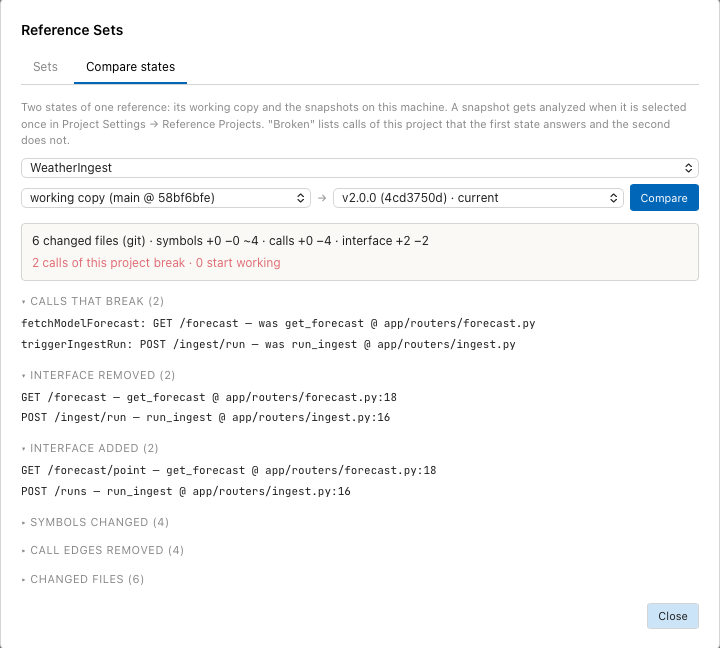
Two calls of Weatherreport break with WeatherIngest v2.0.0: the endpoints moved to /forecast/point and /runs.
Read the result
The summary at the top counts every group. The second line, "N calls of this project break", answers the question "what stops working if the reference moves to this state". Groups without entries are hidden.
| Group | Content |
|---|---|
| Calls that break | Calls of the active project that the first state answers and the second does not. Opens the call in this project. Open by default. |
| Calls that start working | Calls that only the second state answers. |
| Interface removed | Endpoints, handlers and commands the reference no longer offers. Open by default. |
| Interface added | New offers of the reference. |
| Symbols changed | Symbols in changed files whose code differs. A moved symbol counts as changed, not as removed and added. |
| Symbols added, Symbols removed | Symbols that exist in only one state. |
| Call edges removed, Call edges added | Resolved calls inside the reference, from changed files. |
| Files renamed | Renamed or moved files with old and new path. |
| Changed files | Files that differ between the states. Uncommitted changes count. |
An entry of the reference groups opens the file in the state it comes from. Each list is cut at 300 entries; the summary still counts all of them.
Symbols are paired by name and kind. Where a file has several symbols of the same name, the similarity of their code decides which old symbol belongs to which new one, so reordering methods is not reported as a change.
Save the current states as a set
- Choose Analysis › Reference Sets…, or click Reference Sets… in the Reference Projects section of Project Settings.
- Under Save what the references read now as a set:, enter a name and an optional description.
- Click Save current.
The set lists every reference with its state, for example
codeexplorer: working copy · weatheringest: v2.0.0.
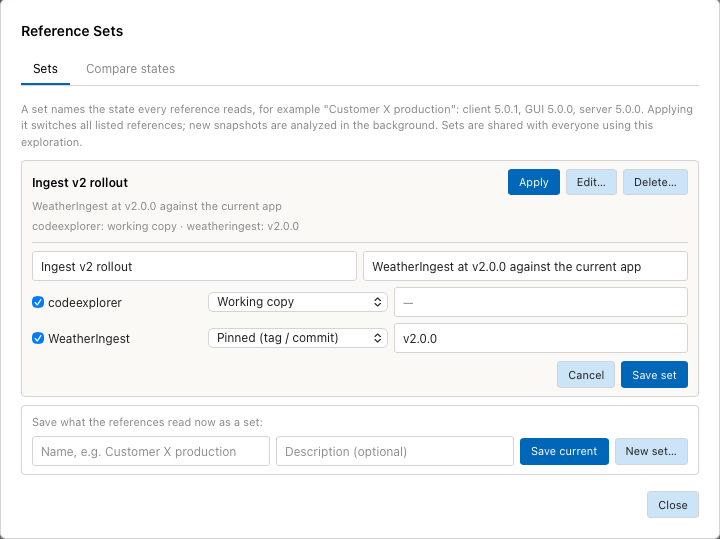
The set "Ingest v2 rollout" keeps codeexplorer on its working copy and pins WeatherIngest to v2.0.0.
Compose or edit a set
New set… composes a set from any branch, tag or commit without switching the references. Edit… changes an existing set.
- Click New set…, or Edit… on a set.
- Enter a name and an optional description.
- For each reference, tick it to include it, and choose a mode: Working copy, Pinned (tag / commit) or Tracking (branch).
- For Pinned and Tracking, enter the tag, branch or commit.
- Click Save set.
Editing does not switch any reference.
Apply or delete a set
- Apply switches every reference of the set to its state. New snapshots are analyzed in the background; existing ones are used at once. The result is listed per reference, with the commit it now reads or the error.
- Delete…, then Delete set, removes the set. The references keep the state they read.
Sets are part of the shared exploration settings. A tag names the same commit on every machine.