Set up the Workflow Policy
The Workflow Policy holds the rules for work packages in
this project. It is stored in .codeexplorer/workflow.toml in the exploration
and travels with it, so everyone who works with the exploration uses the same
rules. You can write it in a dialog or describe your workflow to the AI.
Edit the policy in the dialog
- Choose Git › Workflow Policy…, or click Policy… in the Work Packages tab of the Git view.
- Fill in the fields. The table below describes them.
- To let the AI follow the policy, select Active: the AI follows this workflow.
- Click Save.
As long as no policy file exists, the dialog shows not set up yet and the default values. Save writes the file even if you change nothing.
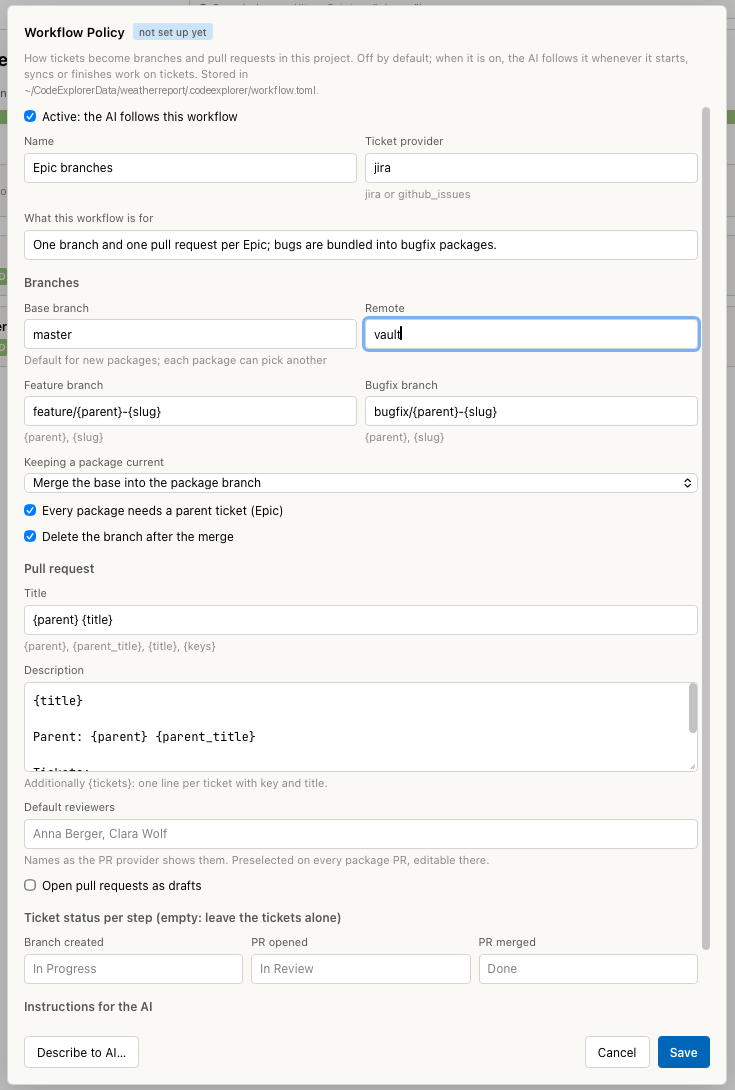
The Workflow Policy dialog before the first save.
Describe it to the AI
- In the Workflow Policy dialog, click Describe to AI…. The dialog closes and the chat opens with a prepared request.
- Answer the AI's questions about your workflow: base branch, branch names, which statuses your tickets have, merge or rebase.
- Approve the preview. It shows the new policy as text. Show file
contents shows
workflow.tomlbefore and after the change.
The AI then documents the policy in a projectdocs entry of type decision and
links it in the field projectdoc. The dialog shows the link as
Documented in …. Later changes are appended to the same entry.
Fields
| Field | Default | Meaning |
|---|---|---|
| Active: the AI follows this workflow | off | When on, the AI reads the policy before it starts, syncs or finishes work on tickets and follows it. The work package functions work either way. |
| Name | empty | Short name of the workflow, for example Epic branches. |
| Ticket provider | jira | jira or github_issues. The provider whose tickets the packages group. |
| What this workflow is for | empty | One or two sentences for the AI. |
| Base branch | develop | Default base of new packages. Each package can pick another one when it is started. |
| Remote | origin | The remote that is fetched and pushed to. |
| Feature branch | feature/{parent}-{slug} | Name template for feature packages. |
| Bugfix branch | bugfix/{parent}-{slug} | Name template for bugfix packages. |
| Keeping a package current | Merge the base into the package branch | How Sync takes in new commits of the base. The other option is Rebase onto the base (force-push with lease). |
| Every package needs a parent ticket (Epic) | on | A package without a parent is refused. |
| Delete the branch after the merge | on | Finish… deletes the package branch locally and on the remote. |
| Title (Pull request) | {parent} {title} | Title template of the pull request. |
| Description (Pull request) | title, parent, ticket list | Description template of the pull request. |
| Default reviewers | empty | Names as the pull request provider shows them, separated by commas. They are preselected on every package pull request. |
| Open pull requests as drafts | off | Opens package pull requests as drafts. |
| Branch created, PR opened, PR merged | empty | Ticket status to set at each step, for example In Progress, In Review, Done. Empty: the tickets are not touched. |
| Instructions for the AI | empty | Rules in your own words, for example which bugs may share a package. The AI treats them as project rules. |
Placeholders
| Placeholder | Available in | Value |
|---|---|---|
{parent} | branch names, pull request | Key of the parent ticket, for example WR-40. |
{slug} | branch names | The package title in lowercase, words joined with -. Umlauts are transliterated (ä → ae). |
{title} | branch names (as slug), pull request | The package title. |
{parent_title} | pull request | Title of the parent ticket. |
{keys} | pull request | Keys of all tickets of the package, separated by commas. |
{tickets} | pull request description | One line per ticket: - KEY title. |
A branch template must contain {slug} or {parent}, otherwise every package
would get the same branch. Branch names are checked against the Git rules for
references. Problems with the stored file are listed in red at the bottom of
the dialog.
Without a parent, {parent} is empty and the name is tidied up:
feature/{parent}-{slug} becomes feature/hourly-forecast.
Ticket statuses
The status names must match the target statuses of your ticket workflow exactly. Tracemoor looks for a transition to that status on each ticket. A ticket that is already in the status is skipped. If no transition leads there, or the transition requires fields, the ticket stays where it is and a warning names it. The Git steps are not undone in that case.