Set up pull requests
Pull requests need a token for the provider of the remote. The token is stored in the operating system's keychain and applies to every project with that provider. The same token serves GitHub Issues and Bitbucket Issues in the Tickets integration.
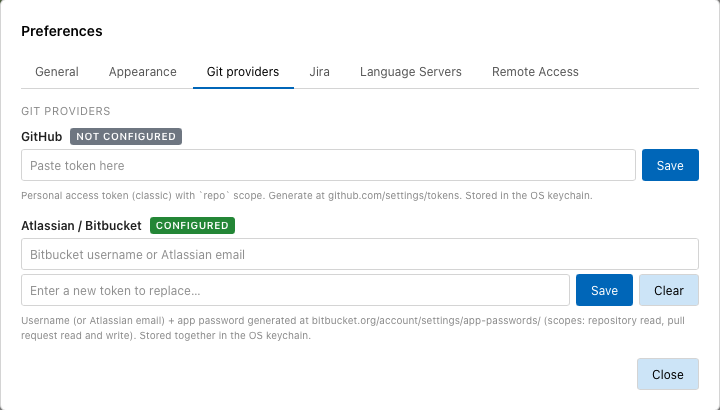
The Git providers tab with a Bitbucket account configured.
Add a GitHub token
Prerequisite: a personal access token (classic) with the repo scope, created
at github.com/settings/tokens.
- Choose Tracemoor › Settings… (Windows/Linux: Edit › Preferences…).
- Open the Git providers tab.
- Under GitHub, paste the token into the field.
- Click Save.
The badge next to GitHub changes from NOT CONFIGURED to CONFIGURED.
Add a Bitbucket account
Prerequisite: an Atlassian API token with scopes for Bitbucket, created at id.atlassian.com/manage-profile/security/api-tokens. It needs the scopes to read repositories, read and write pull requests, and read the user.
- Choose Tracemoor › Settings… (Windows/Linux: Edit › Preferences…).
- Open the Git providers tab.
- Under Atlassian / Bitbucket, enter the Atlassian email.
- Paste the API token into the second field.
- Click Save.
Email and token are stored together. A username with an app password from before Atlassian switched to API tokens works the same way, as long as Atlassian still accepts it.
Replace or remove a token
To replace a token, paste the new one into the field and click Save. Clear removes the stored token.
When the tab asks for a token
If no token is stored for the provider, the Pull Requests tab shows "No GitHub token configured" (or Bitbucket) with the repository. Open Preferences opens the settings dialog. After saving the token, click Refresh in the tab, or return to the window: the tab checks again when the window regains focus.