Traceability matrix
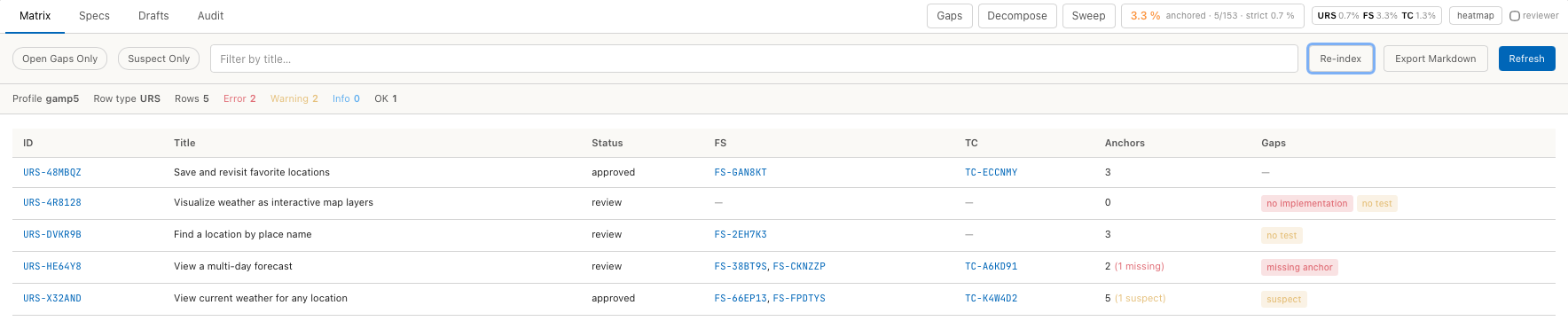
The traceability matrix has one row per requirement and shows the chain of specs below it, the number of code anchors along the chain and the gaps that are still open. It is computed from specs, links and anchors each time it is shown.
To open it, choose Analysis › Open Specs & Audit View and click the Matrix tab.
Read the matrix
The line above the table summarises the matrix:
| Entry | Meaning |
|---|---|
| Profile | The active profile, for example gamp5. |
| Row type | The first type of the trace chain. Each row is one artifact of this type. |
| Rows | Number of rows shown. |
| Error, Warning, Info | Rows whose most severe gap has this severity. |
| OK | Rows without gaps. |
The columns of the table:
| Column | Content |
|---|---|
| ID, Title, Status | The requirement. A click on the ID opens it in the Specs tab. |
| One column per further chain type, for example FS and TC | The linked artifacts of that type. A link counts in either direction. |
| Anchors | Number of code anchors of all specs in the row, with (N suspect) and (N missing) where applicable. |
| Gaps | One badge per gap. The tooltip of a badge gives details. |
The chain is followed step by step. The TC column lists the test cases
linked to the FS of the row, not test cases linked to the requirement
directly. When a requirement has several FS, the row has no no test gap as
soon as one of them has a test.
Gaps
| Gap | Raised when | Severity in GAMP 5 and IEC 62304 |
|---|---|---|
no implementation | No spec in the row has a code anchor. | Error |
no test | The last column of the chain is empty, for example no TC. | Warning |
suspect | At least one anchor in the row is suspect. | Warning |
missing anchor | At least one anchor does not resolve. | Error |
obsolete link | A linked spec has the status obsolete. | Warning |
The profile sets the severity of the first three under
traceability.gap_severity. The last two are fixed. See
Profile reference.
Find open work
| Control | Effect |
|---|---|
| Open Gaps Only | Shows only rows with a gap of severity Warning or Error. |
| Suspect Only | Shows only rows with suspect anchors. |
| Filter by title… | Shows only rows whose title contains the text. |
| Refresh | Computes the matrix again. |
To deal with a suspect anchor, open the spec from the row and resolve the anchor in its Anchors tab. See Anchors.
Update anchors
Re-index resolves all anchors against the current code index. Moved
symbols are found again, changed code makes an anchor suspect. The message
afterwards counts the resolved anchors, for example
Re-indexed 14 files — 12 ok / 1 missing / 0 ambiguous.
Click Re-index after editing spec files outside Tracemoor and after larger code changes.
Export the matrix
- Set the filters for the rows you want to export.
- Click Export Markdown.
- Choose the file name and click Save.
The file contains a heading with the profile, the counts, and a table with
the requirement, its title, the chain columns, the anchor count (✓ or ⚠
for suspect) and the severity. The status of the requirement and the gap
badges are not part of the export.
For an audit, use an audit bundle. It contains the matrix together with the specs and the audit trail, with hashes.