Audit bundles
An audit bundle freezes the evidence of an exploration at one moment: the traceability matrix, all specs, the audit trail, the active profile and a hash of the analysed code. It is a ZIP file with a PDF report and a manifest that lists the SHA-256 hash of every file. The same input produces a byte-identical bundle.
Bundles are managed in the Audit tab of the Specs view.

Create a bundle
- Choose Analysis › Open Specs & Audit View and click the Audit tab.
- Click Create Bundle….
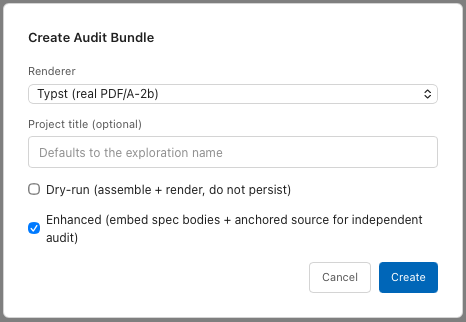
- In Renderer, keep Typst (real PDF/A-2b).
- Optional: enter a Project title (optional). The default is the name of the exploration.
- Tick Enhanced (embed spec bodies + anchored source for independent audit).
- Click Create.
The bundle appears in the list as audit-<date>-<number>, for example
audit-20261112-003. The ZIP is stored in the exploration under
specs/_audits/. Commit it.
| Option | Effect |
|---|---|
| Typst (real PDF/A-2b) | Renders the PDF report as PDF/A-2b for archiving. |
| Mock (deterministic stub) | Writes a placeholder instead of a PDF. For tests. |
| Dry-run (assemble + render, do not persist) | Renders the PDF and opens it in the default viewer. Nothing is stored, no event is recorded. |
| Enhanced | Adds the spec bodies, and for each anchor the file, line and an excerpt of the code. The anchored source files go into the ZIP under source/. |
Without Enhanced the bundle contains no spec bodies. The PDF shows
(no stored body — Markdown source on disk) for each spec. For an audit,
always tick Enhanced.
Contents
| File | Content |
|---|---|
README.md | Overview of the bundle with profile, time and code hash. |
bundle.pdf | The report: cover, traceability matrix, every spec with status, the audit trail, appendices. |
traceability_matrix.md | The matrix as Markdown. |
specs/<ID>.md | Each spec with frontmatter, including signatures. |
events.jsonl | The audit trail, one event per line in recording order, with prev_hash and this_hash. |
profile.yaml | The active profile. |
source/<path> | Enhanced only: the anchored source files, under their path in the project. |
manifest.json | Bundle ID, time, profile and its hash, renderer, code snapshot hash, PDF hash, and the SHA-256 of every other file. |
The code snapshot hash is one hash over all files of the last analysis. It records which state of the code the specs were checked against.
Open and verify a bundle
In the bundle row:
- Open PDF extracts the report and opens it in the default PDF viewer.
- Verify hashes the ZIP again and compares it with the hash recorded when
the bundle was created. The message is
Bundle audit-20261112-003 verified OK, orverification FAILEDwith the number of mismatches.
The list and the reference hashes are stored in the analysis database. After
Analysis › Clear Cache & Re-analyze or on a fresh clone the list is empty
and Verify has nothing to compare against, although the ZIPs are still in
specs/_audits/.
Without Tracemoor, check a bundle like this:
- Compute the SHA-256 of each file in the ZIP and compare it with
file_hashesandpdf_sha256inmanifest.json. - Recompute the audit chain from
events.jsonl: for each line,this_hash = sha256(ts|actor|kind|payload|prev_hash), andprev_hashequals thethis_hashof the line before.
This shows that the files are consistent with each other. That the ZIP is the one created on a given day is shown by its hash, recorded when it was created. Keep that hash outside the ZIP, for example in the commit message or in the validation report.
What a bundle does not contain
- The code itself, except the anchored files of an Enhanced bundle.
- Drafts from
specs/_drafts/. - The state of anchors in the bundle is the state of the last Re-index. Click Re-index in the Matrix tab before creating a bundle.
The AI can create, list, open and verify bundles with audit_bundle_create,
audit_bundle_list, audit_bundle_open and audit_bundle_verify. Creating
a bundle needs Brave mode. See Specs and the AI.