Set up a provider
A provider is the service that runs the AI model. Providers are configured in the AI Settings dialog. Open it with AI › AI Settings… or the gear in the chat header.
The dialog has one tab per provider and the tabs General, MCP and Isolation. Changes apply after Save.
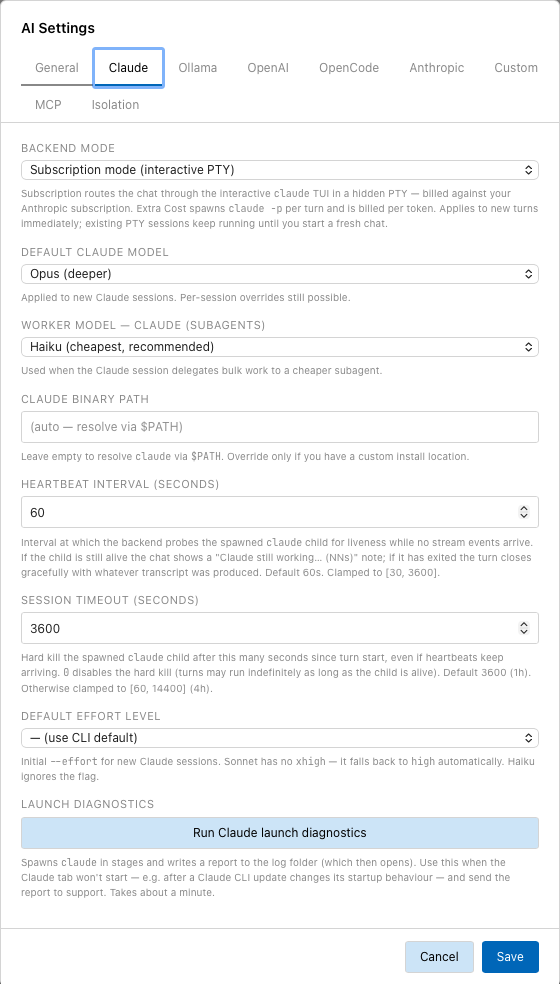
The Claude tab with backend mode, default model, worker model and the limits for a turn.
Choose the default provider
- In AI Settings, open the General tab.
- Choose the Default Provider.
- Click Save.
AI › Default Provider changes the same setting. New sessions use the default provider. A running session keeps its provider. To use another provider, choose it in the provider list of the chat header. That starts a new session.
Claude (CLI)
This provider runs the claude program (Claude Code) installed on your
machine, with the login of that program.
Prerequisite: claude is installed and you have logged in once. The slash
command /login runs the login from the chat.
| Setting (tab Claude) | Effect |
|---|---|
| Backend Mode | Subscription mode (interactive PTY) runs claude in a hidden terminal and bills the turns against your Claude subscription. Extra Cost (claude -p per-token API) starts claude -p for each turn and is billed per token. The change applies to new turns; running terminal sessions continue until you start a new chat. |
| Default Claude Model | Model for new sessions: Sonnet (recommended), Opus (deeper), Haiku (faster), Fable (most capable, costly). |
| Worker Model — Claude (subagents) | Model for subagents the session delegates work to. See Longer tasks. |
| Claude Binary Path | Path to claude. Empty: found through $PATH. |
| Heartbeat Interval (seconds) | How often Tracemoor checks that claude is still running while no output arrives. The chat then shows "Claude still working…". Default 60. |
| Session Timeout (seconds) | A turn is stopped after this time, even if claude is still running. 0 disables the limit. Default 3600. |
| Default Effort Level | Initial effort level for new sessions. Sonnet has no X-High, it uses High instead. Haiku has no effort levels. |
| Run Claude launch diagnostics | Starts claude in stages and writes a report to the log folder. Use it when the chat does not start, for example after a claude update. Takes about a minute. |
On Windows, the subscription mode is not available. The chat uses claude -p.
Anthropic (API)
This provider calls the Anthropic Messages API directly. claude does not need
to be installed.
- In AI Settings, open the Anthropic tab.
- Choose the Authentication:
- API key (Console billing): your own key from the Anthropic Console, billed per token. Enter the key under API Key and click Save next to the field.
- Subscription (billed as extra-usage): reuses the login token of
claude. No key is needed. Turns are billed against the extra usage of your Claude plan.
- Click Test & Load Models. The model list is filled with the models your account offers.
- Choose the Default Anthropic Model.
- Click Save.
With Subscription, the tab shows whether extra usage is enabled on your account and how much of it is used. If extra usage is disabled, turns stop with an error once the regular quota is used up.
"Subscription" means different things in the two Claude providers:
| Provider | "Subscription" is billed against |
|---|---|
| Claude (CLI), Subscription mode | the regular quota of your Claude plan |
| Anthropic (API), Subscription | the extra usage of your Claude plan |
OpenAI and OpenCode
OpenAI (API) uses the OpenAI API. OpenCode (Zen gateway) uses the OpenCode Zen gateway, which offers models of several vendors behind one key.
- Open the OpenAI or OpenCode tab.
- Enter the API Key and click Save next to the field.
- Click Test & Load Models.
- Choose the default model.
- Click Save.
Both APIs accept at most 128 tools per request. When the tools of Tracemoor
, the reference projects and external MCP servers exceed that number,
Tracemoor drops the tools at the end of its priority order. The file tools,
external MCP servers, the core tools of the active project and the xref_*
tools come first, so the less used tools of Tracemoor are dropped. Claude
and Anthropic have no such limit.
Ollama
Ollama (local + cloud) uses an Ollama server.
- Open the Ollama tab.
- Check the Base URL. The default
http://localhost:11434fits a standard installation. - Optional: enter a Cloud API Key (ollama.com) to also list the hosted models of ollama.com, marked "(cloud)". These run on ollama.com, not on your machine.
- Click Test & Load Models and choose the Default Ollama Model.
- Click Save.
Only models that support tool calls are listed. Models without tool calls cannot use the index.
Custom providers
A custom provider is any server with the OpenAI Chat Completions API, for
example mlx-openai-server, vLLM or LM Studio on your own machine.
-
Open the Custom tab and click + Add Custom Provider.
-
Fill in the fields:
Field Example Title Gemma 4 26B localModel mlx-community/gemma-4-26b-a4b-it-4bitAPI Base URL http://localhost:8080/v1API Key not-neededfor most local servers -
Click Save.
Each custom provider appears in the provider list of the chat header. Its key is stored in the settings file, not in the keychain.
Where keys are stored
API keys for Anthropic, OpenAI, OpenCode and the Ollama cloud are stored in the
keychain of the operating system, never in ai-settings.json. Clear next
to a key field removes the key.
Development builds (npx tauri dev) store keys in a protected file instead,
because every rebuild has a new code signature and macOS would refuse it access
to the keychain entries of the previous build.
Change model and effort during a session
- Model: the model list in the input bar, AI › Change Model, or
/model <name>. - Effort: the dots in the input bar, AI › Effort Level, or
/effort <level>.
The provider of a session cannot change.
Other settings on the General tab
| Setting | Effect |
|---|---|
| Translation Provider | Provider and model for Translate to English in the ticket dialog. Anthropic uses the API key from the Anthropic tab, never the Claude subscription. |
| Default Permission Mode | Mode of new sessions. See Session modes. |
| Runtime Recording Buffer Capacity | Number of browser events kept while recording. See the runtime section. |
| Keep tool usage in chat, Send on Ctrl/Cmd+Enter, Check git status before new chat | See Chat panel. |
| Verbose debug logging (interrupt & incremental save) | Writes detailed log entries for stopping a turn. For error reports only. |